Showing posts with label self-stick. Show all posts

Friday, June 15, 2018

Applying Self-Adhesive Decals - or - Sticking Stickers Where You Want them Stuck


Many model rocket kits come with decals to add visual interest to a model - and if it's a scale kit, to add some realism.

Decals come in two varieties: waterslide and self-adhesive or self-stick.

Many builders, myself included, prefer waterslide decals. You soak them in water for a minute or two, and they slide right off their backing. You slide them in place on the rocket, and if you've made sure to dab a little water on the model first, you can then slide the decals around until they're in just the right spot. Then you dab lightly with a paper towel or cotton ball to remove any excess water and air bubbles, and when the decals set, they're pretty much permanent.

Waterslide decals are a little tricky to get used to at first, but once you do, they're much lighter and thinner, and they look like they're actually a part of the model's paint, rather than something just stuck there afterwards.

Most significant, they are re-positionable if you do them right, so you don't have to get them in exactly the right spot straight off the backing. With a little water, you have time to work with them before they're stuck.

Self-stick decals are really just stickers, and many rocketeers hate them. They're not only thicker and heavier than waterslides, if you don't do them right, they're stuck, wherever you happen to touch them to the model. So if you don't get them on straight the first time, you may never get them straight. It can be very frustrating.

The Estes Silver Arrow - an easy to assemble kit, and my very first build.

I got the sticker on crooked, and tried to re-do it, but I just tore the darn thing.
My very first rocket - the Estes Silver Arrow, from the launch set I bought when I started out - had stickers. Man, I hated that rocket! I got the silver decal on crooked, then tried to straighten it out, only to have it rip itself and the body tube. It was so ugly! I was happy to give it away to the son of a friend of mine, who broke it a day later.

I had a bit better luck with my first Estes Crossfire ISX, a Skill Level 1 kit that also came with stickers. But I still wasn't happy. I had bubbles under the decals, raised edges, and if you look closely, you can see that things are crooked.

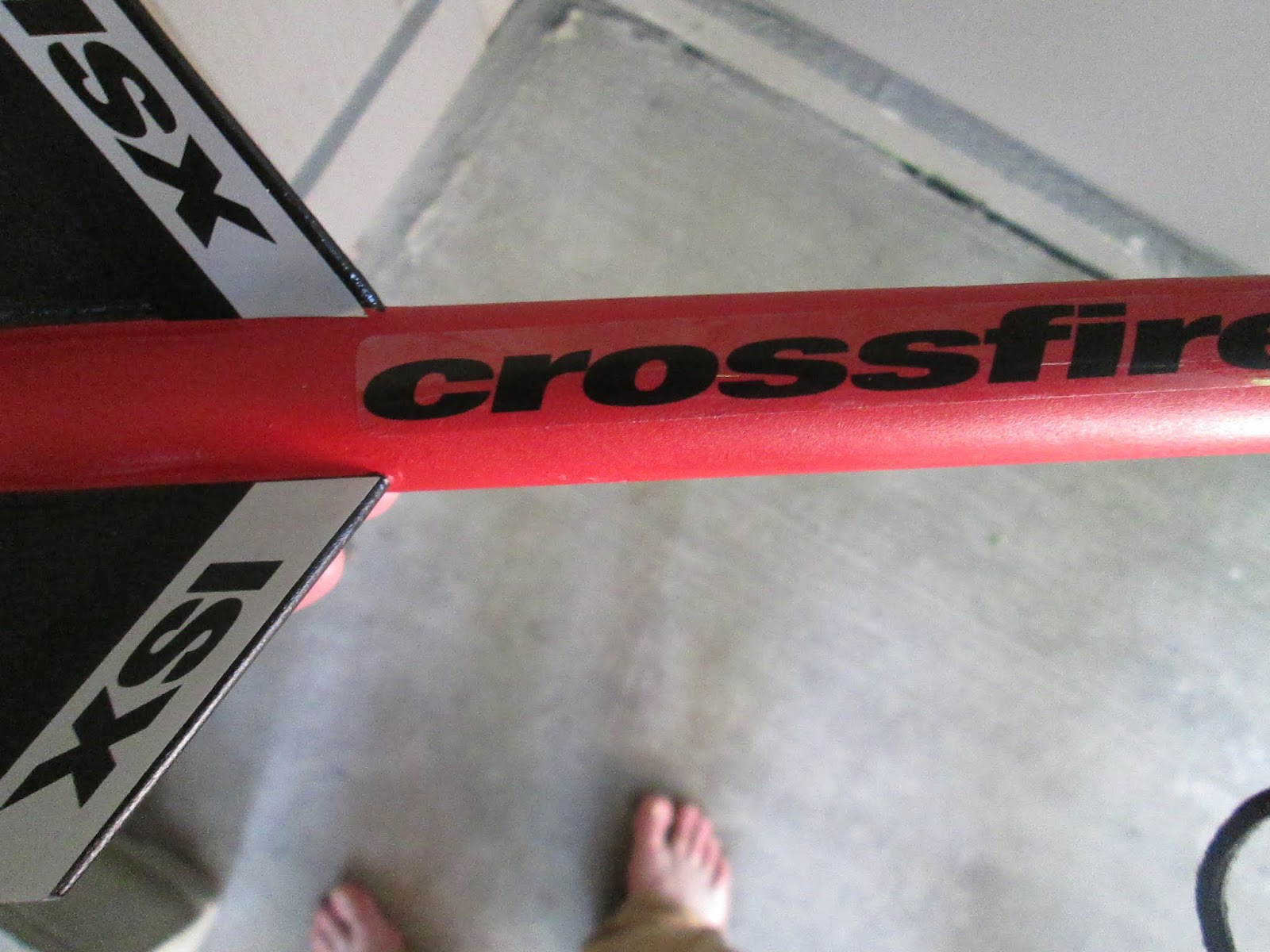
Some imperfectly placed self-stick decals, with overhangs, bubbles, etc. And my feet.

Not only that, I found the process of putting them on so stressful, as I was trying to be so careful not to mess up, that it took me a couple hours and I needed a break after each decal.

I hated self-adhesive decals so much that for a while, if a model came with them, I'd either not buy that model, or I would decide to do a completely different paint job.

But since then, I've learned the trick to doing it right. You can get those self-adhesive decals on your rockets where you want them to go the very first time, and if you mess up, you can take them off and re-position them. It's a lot less stressful than just trying to jab a sticker into the right place on your rocket.

There are three newer rockets in my current active fleet with self-stick decals, and despite my continued preference for waterslides, these three are among my nicest builds. They are:

The Quest Superbird...


...a newer Estes Crossfire ISX, which I modified, adding a drag-reducing tail cone...


(I really should post the build I did of that rocket, because I like how it turned out.)

...and the Estes U.S. Army Patriot, seen at the top of the post.

All of these might be challenging, and two of these have decal wraps, meaning the sticker goes all the way around the model - and is supposed to meet itself on the other side! That's tricky enough to apply if you aren't also worried the decal will be stuck once you place it on there.

My method is similar to the method used when applying vinyl decals - such as those sold by Stickershock23.com. With one or two little tweaks, the same method can be applied to self-adhesive decals.

OK, here's the method. You will need:
  • Your finished, painted rocket
  • Your decal sheets
  • A pair of scissors
  • Some masking tape
  • A spray bottle filled with a mixture of water and a few drops of dish soap

First, you will notice that the decals are printed on a plastic sheet with a backing on them. No surprise there - just like any stickers you have ever seen. You need just the stickers, not the extra plastic it's printed on. The first step is to remove all the surrounding sticker plastic while leaving the decal itself stuck to the backing. You may need to hold the decal down as you peel the excess off.


Above are the decals from the U.S. Army Patriot. I've removed the excess from the bottom one. You can see that all that's left is the decal itself - there's no extra black around it. This allows you to accurately scan the decal sheet, so that you can either make your own waterslide decals if you want, or clone the rocket and print your own decals at a later date, or share the decal scan with someone who needs it. It's also necessary for this method.

Next, cut the individual decals out with scissors - still leaving them on the backing.


Take your first decal and trim the backing as closely as you can to the printed decal, taking care not to cut into the sticker itself.


Now you will place the decal where you want it. You're not going to stick it on just yet, so again don't remove the backing.

If you're doing a wrap, make sure to wrap it nice and tight around the rocket, and make sure the two ends meet and that the wrap is nice and straight.


Then you will take a piece of the tape and carefully tape one edge of your self-stick decal in place. Again, the backing is still on the sticker at this point. That tape will act as a hinge, so that you can let go of the rocket and sticker, and it will stay in the same place.

(You can see the tape in place in the photo above - that's just because it's tough to take pictures while doing this, so I had to take that shot out of sequence, after I'd already secured the decal in place.)


Now that you've got your tape hinge in place, you can set the rocket down if you need to. The decal will go right back where you want it in a minute.


Get your spray bottle with the soap and water mixture ready and close at hand.


Now peel the backing off your decal, holding it away from the rocket. Spritz the decal and rocket with a light mist of the water and soap mixture.


Keeping the decal taught, carefully lay it down on the rocket, working from the tape end. You can squeeze out extra water and air bubbles with your fingers as you go.

If you are doing a wrap, make sure to remove the tape hinge before you get to the end of the decal. Peel the tape off in the opposite direction from which you're laying the decal - so that the tape doesn't pull the sticker off!

Oops - my feet are showing again!
Now you can press the decal the rest of the way down. If need be, squeegee the rest of the excess water and air bubbles out with fingers or a poster squeegee.

Sometimes I use a poster squeegee, seen here.

The decal should be perfectly in place, but if you've made a mistake, and the decal is crooked or the ends of your wrap don't match up, you can easily pull the decal back up, thanks to the soap and water!


Take your time getting the placement right before you put your tape hinge down, and you shouldn't have much of a problem.


This method will help you get your stickers on straight, where you want them, and eliminate bubbles.


It takes some care, but this method is much faster and easier to get the results you want than merely trying to get a sticker perfectly in place the first time. There's no way I would have made this rocket look this nice if I didn't use the method described here.

This can be used for pretty much any self-stick decal. You just have to figure out where the best place is for the hinge to go. It might be on an end, or it might be on a longer side.


Take your time, and you'll get those self-adhesive decals where you want them. Your rockets can look the way you envision them!

Follow me on Twitter.

Like my Facebook page for blog updates and extra stuff.

Have a question you'd like to see addressed on this blog? Email me at iamtherocketn00b@gmail.com.

Sunday, May 3, 2015

Mid Power: Building the Quest Big Dog (Part 11) - Decals and Fixes

Click here for Part 1

Most decals for rocket kits come in one of two types: waterslide decals and self-stick decals. You can also get custom decals made of vinyl or other materials, but for your basic kits, waterslide and self-adhesive are what you will see.

Waterslide decals usually come on a slick backing paper, and appear to be stuck in place. You cut the decals out one by one, and place the whole thing - backing and all - in a bowl of water. In a few minutes, the decal becomes loose, and you literally slide the decal off the backing and onto the rocket. The adhesive soaks up the water and becomes slippery, and for a minute or so you are able to slide the decal around in place until you're happy with it, then pat it dry with a paper towel.

The advantage of waterslide decals is that they are thinner, so they look more like they're a part of the actual paint job of the rocket.


The waterslide decals on the Quest Magnum Sport Loader really look like part of the paint job.

When well applied, they're unlikely to peel off. And they can be treated with various products so that they shrink into any crevices you may have to place them on (such as on a model airplane), so that they really look like a part of the model itself. Another advantage is that they are repositionable for a few minutes while wet, so if you don't get the decals perfectly placed on the rocket the first time, you are able to carefully slide it around until you're happy with it. If you finish the rocket with a coat of clear spray paint, you won't see any edges at all, and it looks great.

The main disadvantage is that they're apt to tear if you're not careful, and if the decal happens to fold over and stick to itself while you're handling it, it's probably ruined.

A waterslide decal on my Estes Cosmic Explorer. I tore this in a couple places, and though
I was able to slide the pieces mostly together, there were some bits that were ruined.

Self-stick decals are basically stickers. They go on, and they stick there. They're not terribly repositionable, but there is a trick you can use to get around that. They're thicker, and you can usually tell they're stickers - you can really see the edges.

The self-adhesive stickers on my Estes Crossfire ISX. You can clearly see the raised edges of the stickers, and my feet.

I really prefer waterslide decals, but there are some great kits which use self-adhesives, and the Big Dog is one of them. The main decal is one that wraps completely around the airframe, extends about nine inches down the body tube, and it's what gives the rocket its character.

I was nervous about getting the large decal on straight, so I put it off a few days. Not a bad idea, anyway, to let your paint cure fully before applying anything sticky to it. If I'd gotten the decal on crooked, it would have looked lopsided - one side of the decal should be flush with the very end of the body tube, so I had to make sure I got it on just right.

I wanted to check the decal to make sure it was the right size for the rocket - if you read my earlier posts, you know that some of the dimensions of the Big Dog don't add up - the centering rings were loose, and the fin marking guide was too short, because while the kit is in fact 1.97 inches in diameter, the box says it's 1.92 inches. I figured there'd be a gap in the decal - not a big deal, since it would be on the back side of the rocket, facing the launch rod - but I wanted to be sure.

So I took a piece of paper and used it to measure the width of the decal, then I wrapped the paper around the body tube. The mark on the left is where the paper met up - the actual circumference of the rocket. The mark on the right is the right-hand edge of the width of the decal.


The decal is too wide! This means that if I put it on the rocket as-is, the decal would overlap itself.

I'm so glad I checked! I could have dealt with a gap, but I did not want the decal to overlap - overlapping could lead to peeling. I decided that trimming the decal was my only option.

I laid the decal down on my cutting mat and taped it into place.


I used the same piece of paper with which I'd measured the circumference of the rocket to make two pencil marks on the decal, telling me how much I needed to trim off. Then I lined those marks up with the back side of a metal ruler (to get a nice, straight cut), and taped the ruler in place - I did not want the ruler to slide around on the plastic decal while I was trimming it. I needed precision here!


Then, with a very sharp, brand new hobby knife blade, I slowly and carefully trimmed off the excess.


Most rocket kits are well-designed, but you do find some flaws now and again. It never hurts to check if you're unsure about a certain part or kit, and make some adjustments. Once you've built a few rocket kits, you'll know where you can safely stray from the instructions, and where you may need to make some changes for appearance, or even safety and functionality.

* * *

I'm going to digress here for a moment, because I think it's important to know, especially if you're a fellow rocket n00b. Building kits, reading about how model rockets work, and building that knowledge base can sometimes help you avert disaster. On another Quest kit - the Quad Runner - I decided this was really necessary for the kit to work properly.


You see, the centering rings which hold the motor tube in place have two functions. The first, of course, is to keep the motor in line with the center of the rocket. But centering rings also create a seal on the aft end of the rocket.

When the rocket motor has used up all its propellant, there is a second charge - the delay grain - which burns slowly without producing any thrust, to allow the rocket to slow down before the parachute deploys. Finally, there is a third charge - the ejection charge - which creates a small explosion coming out the top of the motor, forcing hot gasses into the rocket body tube.


This pressurizes the inside of the rocket, forcing the nose cone to pop out and allowing the parachute to deploy so the rocket can land safely.

If your centering rings were full of holes, say, or there were some kind of gap between the motor tube and the airframe, some of that ejection gas would escape out the back. Meaning the airframe would not pressurize properly. If enough ejection gas leaked out quickly enough, that could mean that there would not be enough internal pressure inside the rocket to eject the nose cone. No ejection, no parachute. And since rockets are designed to fly nose cone first, the rocket would then take a nose dive at the Earth at incredible speed and hit the ground hard and fast, completely destroying the rocket. That seal at the back is very important.

With the motor in place and the centering rings properly glued in, the
only place for ejection gasses to go is up inside the rocket airframe.

The Quad Runner is a four-motor cluster rocket, so it has four motor tubes side by side, and because of that, its centering rings are different. They have clover-shaped cutouts to hold the four motors.

On the left and right, the centering rings for the Quest Quad Runner 4-motor cluster mount

 This means that running down the center of the cluster of tubes is a diamond-shaped gap. To fill that gap and block ejection gasses from escaping, an additional, diamond-shaped piece is added to the motor mount.

This piece goes in the gap between the tubes. It also holds the shock
cord, and uses a wing nut to keep the motors in place
 But I realized there was a problem. There was a little space between the tubes themselves - they were spaced slightly apart. And by looking at the measurements of the kit instructions, and actually peaking between the motor tubes themselves, I realized that the centering rings did not line up with the little diamond-shaped pieces in the middle of the motor mount.

This mean that ejection gas could travel down the center of the motor mount, between the motor tubes, get around the diamond-shaped piece in the middle, then escape out the back of the rocket between the motor tubes.

Now, it's quite possible that the gaps here are small enough that not enough ejection gas would escape out the back, and the rocket would be fine.

But what if I had a nose cone that was a little snug? What if one or more of the motors didn't ignite, and there were fewer ejection charges going off? I wasn't going to take the risk of one of my more expensive kits taking a ballistic nose dive to oblivion.

So, despite it's not being in the instructions, I decided the best solution was to fill in the gaps between the motor tubes themselves. I simply added a bead of glue to create a fillet.

Glue fillets between the motor tubes themselves sealed off any leaks
 This sealed the gaps I was worried about, and would better ensure a successful recovery of the rocket.

The point is, the more you know about rockets, the better able you are to recognize those few times when a kit manufacturer has made a design error - or when you yourself have made a building error - and to correct for those problems.

* * *

Back to the decals!

In order to get the decal straight, I needed some kind of guide or reference. With a piece of aluminum angle, I drew a pencil guide line straight up the back side of the rocket, starting with the hole for the forward rail button.


Self-stick decals will usually get permanently stuck wherever you lay them down, so if you place them incorrectly, you can't adjust them.

Estes Silver Arrow with a crooked self-stick decal
But there's a trick you can use to get around this. Take a small bowl of water and add a little dish soap - a drop or two - and stir to dissolve. Before you stick the decal onto the rocket, dip the decal into the water. It will still stick to the rocket, but if you get it on crooked, you can peel it off without damaging the paint or the decal.

The large wraparound decal is too large for a small bowl, so I used a large metal mixing bowl and added a full squeeze of dish soap. To make sure I'd gotten the ratio right, I first applied the small decals that went on the fins. I figured if I weren't able to peel these off, they'd still be relatively straight, and it wouldn't be crucial. I could add more dish soap to the water before doing the large wraparound.

But I was able to peel and re-stick the fin decals, so it was a go.

I was pretty sure I would be unable to get the wraparound decal on straight by myself. So I asked my girlfriend to hold the rocket for me. She held the rocket parallel to the ground, with the guide line on the back side facing me. I dipped the large decal into the soapy water, then lined one edge of it up with the guide line, making sure the end of the decal matched up with the end of the airframe. Then, slowly, she rotated the rocket while I pressed the decal into place, squeezing out air bubbles and pulling the decal taught to keep it straight. I had to peel and replace the decal a couple of times, but eventually, it went on straight.

If there's a better, easier, or more accurate way to apply a wraparound decal, please let us know in the comments section!

After applying the rest of the decals myself, I popped the nose cone on to have a look at the nearly-finished rocket.


The Dupli-Color Cardinal Red paint I selected was not a good match for the decal - the Rust-Oleum Apple Red paint would have been much closer. This was my first time using lacquer paint, so I can't be sure, but I think the red paint on the nose cone darkened a little as it cured.

This was when I discovered that I had already bought an extra can of Rust-Oleum Apple Red specifically for the Big Dog.


Now I have a ton of red - guess I need to build some more rockets!

Now, I'm pretty picky, so I do have to admit that this color mismatch does bother me. But other than that, and considering all the things that could have gone wrong on this build, not bad!

The rocket is nearly finished - just a few more details before it's ready to fly.

 Click here for Part 12 - finishing up!

Like my Facebook page for blog updates.